Cross Column

Showing posts with label Fusion Web Applications. Show all posts

Thursday, October 11, 2012

Passivation and Activation in Oracle ADF—jbo.passivationstore

The passivation/activation implementation in Oracle ADF Business Components[1] is designed to keep transaction states across multiple requests or sessions.

In this article, we will discuss one aspect of the passivation/activation implementation in Oracle Fusion Applications—the passivation store.

Passivation and Activation


There are two kinds of pools in use when running a typical Fusion web application:

  • Application Module (AM) pools
  • Database connection pools

An application module pool is a collection of instances of a single application module type which are shared by multiple application clients. As for database connection pools, they are usually maintained by the J2EE container. You can read [9] for more details. To tune Fusion Application's performance, you need to understand both pools[8].

Each time a user accesses a resource and that resource uses an AM to display data, the Application Module pool manager assigns an AM instance to the user session. If the pool runs out of connections, the AM pool Manager passivates the state of one of the sessions (either in the database or in a file), thus releasing an instance and assigning it to the new session. When the user that was passivated resumes their work, ADF will activate their state from the configured store. This is done automatically for you.

Passivation Store


In order to manage application module pending work, the application module pool asks AM instances to "snapshot" their state to XML at different times. If the value of the jbo.dofailover configuration parameter is true (default), then this XML snapshotting will happen each time the AM instance is released to the pool.

The AM instance snapshots can be saved either in the database or in a file. To configure it, you can set jbo.passivationstore to be:
  • database
  • file

File Store


If you set jbo.passivationstore to be file, by default passivation should go to use.dir. However, you can change the location by setting:
  • -Djbo.tmpdir
For example, in our CRM Fusion Application, we have selected file to be the passivation store. But, we didn't set its location (i..e jbo.tmpdir). By default, it used "user.dir":
  • <Installation Home>/instance/domains/<Server Name>/CRMDomain

To find out where "user.dir" points to on Linux, you can do:

$ls -l /proc/<pid>/cwd
cwd -> /c1/mt/rup1/instance/domains/myserver/CRMDomain


So, going to that directory, you can find a bunch of files used by CRM for passivation:

-rw-r----- 1 mygrp testuser 6380   Oct 11 10:04 BCacc13d9BCD
-rw-r----- 1 mygrp testuser 263    Oct 11 10:04 BC325e092dBCD
-rw-r----- 1 mygrp testuser 127186 Oct 11 10:04 BC166a7e7fBCD


DB Store


If you set jbo.passivationstore to be database (default), XML snapshots will be written to a BLOB column in a row of the PS_TXN table in the database.

While the file-based option is a little faster, unless your multiple application server instances share a file system, then the the database-backed passivation scheme is the most robust for application server-farm and failover scenarios.

Configuration Parameters


To summarize, the following configuration parameters are related to this topic:
  • jbo.dofailover
    • Enables eager passivation or not
  • jbo.passivationstore
    • Dictates the store type
  • jbo.tmpdir
    • Specifies the location for file store
You can reference [10] for other application module pool configuration parameters.

References

  1. Oracle ADF Essentials
  2. Reusable ADF Components—Application Modules
  3. Java System Properties
  4. Why is the user.dir system property working in Java?
  5. ADF BC Passivation/Activation and SQL Execution Tuning
  6. Demystifying ADF BC Passivation and Activation
  7. Ensuring that your ADF Application is Passivation/Activation Safe
  8. Understanding Application Module Pooling Concepts and Configuration Parameters
  9. Monitoring WebLogic JDBC Connection Pool at Runtime
  10. What You May Need to Know About Application Module Pool Parameters

Wednesday, June 15, 2011

Reusable ADF Components—Application Modules

In the course of application development, certain components will often be reused. Creating and consuming reusable components should be included in the early design and architectural phases of software projects.

Whether the reuse happens within the same application, or across different applications, it is often advantageous to package these reusable components into a library that can be shared between different teams. These shared libraries can be added to a repository. Later if you need a component, you may look into the repository for something to be reused.

Multiple Oracle ADF components are reusable, which include[1]:
  • Application modules
  • Business Components
  • Data controls
  • Task flows
  • Page templates
  • Declarative components
These reusable components can be packaged into the ADF Library for reuse in applications (see [4] for how-to). Creating an ADF Library JAR involves compiling the project and validating the components, creating a resource service file, control files, an adflibREADME.txt, and adding the relevant project files into a JAR.

In this article, we will discuss a specific reusable component—Application Module. Application modules are associated with Business Components. When the reusable application module was packaged, the JAR includes the Business Components used to create the application module. These components will be available for reuse.

For packaging application modules, JDeveloper adds three control files to the JAR:
  1. oracle.adf.common.services.ResourceService.sva
  2. Manifest.mf
  3. adfm.xml
The service resource file for an application module includes entries for the Business Components associated with the application module, as well as an entry for the application module data control.

When you add an application module to a project, the application module appears in the Data Controls panel.

What's Application Module

Within a running BC4J application, one can think of the following containership of application objects:
  • Root Application Module contains nested Application Modules
  • An Application Module contains View Objects
  • A View Object contains Row Sets
  • A Row Set contain Row Set Iterators
Application Modules can be nested. That is, an Application Module can (logically) contain one or more other Application Modules (i.e., nested AMs) as well as View Objects. The outermost containing Application Module is referred to as the "root" Application Module.

What Do You Need to Know about Nested Application Module

In this Andrejus Baranovskis' article, it has two application modules which contain View Objects created from Employee and Job tables and are packaged into two ADF libraries
  1. adflibEmplooyeesApp.jar
  2. adflibJobsApp.jar
These two libraries can be imported into an ADF web application in two ways:
  1. Integrating ADF JAR's directly into the ViewController project (i.e., using Application Modules directly from ADF JAR's)
  2. Integrating ADF JAR's into the Model project with its own Application Module (i.e., Application Components from imported libraries are created as nested Application Modules)
Using either approach, you need to add both JAR's to the application first. When you add an ADF Library JAR to a project, either by using the Resource Palette or by manually adding the JAR, an ADF Library definition is created in the project. The ADF Library JAR file will be added to the class path of the project. The project will access and consume the components in the JAR by reference. See here for how to add an ADF Library JAR to a project using the Resource Palette.

In the first approach, two JAR's are added to the consuming project's (i.e., ViewController project) class path and so is available for reuse. See here on how to add them to the ViewController project manually. As shown below, adflibEmployeesApp.jar and adflibJobsApp.jar are added to the ViewController project's class path:
LinkIn the second approach, you first create a new Application Module (i.e., HrModule) in the Model project. See here on how-to. To specify a composite root application module that nests an instance of an existing application module, you use the overview editor for the application module. See here on how-to.

As shown below, EmpModule and JobsModule are nested under root Application Module HrModule in the second approach:
Important notes about nested application modules:
  • A nested Application Module design is useful for applications that define several functional
  • sub-applications that share the same transaction context and transaction caches.
  • With a nested Application Module design, it is easy to re-deploy nested Application Modules as standalone Application Modules in different client applications without having to modify the metadata for the other existing Application Module.
  • When a root application module contains other nested application modules, they all participate in the root application module's transaction and share the same database connection and a single set of entity caches.
    • This sharing is handled for you automatically by the root application module and its "Transaction" object.
  • A nested Application Module cannot see the instances of any other Application Modules that might be nested beneath the same root.
  • The API for application modules also supports nesting of application modules at runtime.
  • Nested Application Module can help performance by reducing database connection usage (i.e., sharing a single database connection instead of owning a separate connection per AM).

Further Considerations

  • You should consider how to organize and group the library JARs in a structure that fits your organizational needs. For example,
    • Usually you want to have two separate application modules to support UIs and define services because
      • UI application modules may contain additional view objects and context values
        that are only required for a particular UI, but not needed by a business service.
      • Application modules that define public services are versioned, but internal UI
        application modules are not.
  • You should also consider creating standardized naming conventions so that both creators and consumers of ADF Library JARs can readily identify the component functionality.
    • You want to try to have unique names to avoid naming conflicts with other projects, components, or connections in the application.
    • Naming conflicts could arise from components created in the consuming application and those loaded from other JAR files.
  • A project corresponds to one ADF Library JAR.
    • If you create multiple projects and want to reuse components from each of the projects, you may need to create an ADF Library JAR for each project.
  • You can package multiple components into one JAR file, or you can package a single component into a JAR file.
    • Oracle ADF and JDeveloper give you the option and flexibility to create reusable components that best suit you and your organization.
  • You should avoid metadata naming conflicts between projects that will be combined at runtime.
    • The basic package naming requirement is that ADF metadata registries (.dcx,.cpx, and so on) are generated based on the project's package name. So, make the package name unique.

References
  1. Reusing Application Components
  2. Defining Nested Application Modules
  3. What you may need to know about Nested Application Module
  4. How to Package a Component into an ADF Library JAR

Monday, May 3, 2010

Oracle ADF BindingContext and BindingContainer

The Oracle ADF binding context is a runtime map (accessible through the EL expression #{data}) of all data controls and page definitions within the application. The binding context does not contain real live instances of these objects. Instead, the map contains references that become data control or binding container objects on demand. The ADF lifecycle creates the binding context from the application module, DataBindings.cpx, and page definition files.

In Oracle ADF, the group of bindings supporting the UI components on a page are described in a page-specific XML file called the page definition file. The ADF Model layer uses this file at runtime to instantiate the page’s bindings. These bindings are held in a request-scoped map called the binding container, accessible during each page request using the EL expression:
  #{bindings}

This expression always evaluates to the binding container for the current page. For example, to access the collectionModel of binding object named MyShoppingCart , you use the EL expression:
  #{bindings.MyShoppingCart.collectionModel}

BindingContext

The binding context lives in the HttpSession for each end user. It holds references to lightweight application module data control objects that manage acquiring an application module instance from the pool during the request (when the data control is accessed) and releasing it to the pool at the end of each request. The data control holds a reference to the ADF session cookie that identifies the user session. The binding context also holds references to binding containers. The binding context might contain many data controls and many binding containers.

There are three options to access the binding context at runtime by Fusion Web Applications:
  1. BindingContext.getCurrent()
  2. BindingUtils.getBindingContext()
  3. JsfUtils.resolveExpression("#{data}")
For option 1 and 2, they are implemented in the same way internally:
  import oracle.adf.model.BindingContext;

  (BindingContext)ADFContext.getCurrent().getSessionScope().get("data");
However, option 3 is different and resolveExpression() is defined to be:
public static Object resolveExpression(String expression) {
FacesContext facesContext = getFacesContext();
Application app = facesContext.getApplication();
ExpressionFactory elFactory = app.getExpressionFactory();
ELContext elContext = facesContext.getELContext();
ValueExpression valueExp =
elFactory.createValueExpression(elContext, expression,
                     Object.class);
return valueExp.getValue(elContext);
}

As you can see it, the third approach is more expensive because it involves extra expression parsing and syntactic validation of the expression.

BindingContext is an object that implements the Map interface and exposes generic methods to access the binding layer. For example, to find a data control, you could use the findDataControl()method on BindingContext
  findDataControl(dc_name)


BindingContainer

To access binding container, you first retrieve binding context as described above; then you use binding context's getCurrentBindingsEntry method to retrieve binding container object:
  import oracle.binding.BindingContainer;

  BindingContainer bc = bindingContext.getCurrentBindingsEntry();
Internally, getCurrentBindingsEntry() is implemented as follows:
  (BindingContainer)ADFContext.getCurrent().getRequestScope().get("bindings");

If you use option 3 as described above, you can retrieve binding container in a more straightforward way (although it's still more expensive):
FacesContext facesContext = FacesContext.getCurrentInstance();
ExpressionFactory exp = facesContext.getApplication().getExpressionFactory();
DCBindingContainer bindingContainer =
(DCBindingContainer)exp.createValueExpression(facesContext.getELContext(),
"#{bindings}",DCBindingContainer.class).getValue(facesContext.getELContext());

Fusion application developers who prefer working with type-safe methods can cast the bindings instance (i.e., BindingContainer) to DCBindingContainer:

DCBindingContainer object exposes more methods than the its super class object BindingContainer. For example, you can access the application module's client interface from this DCBindingContainer by naming an ADF action binding or an ADF iterator binding as shown below:
// 1. Access the binding container
DCBindingContainer bc = (DCBindingContainer)getBindings();
// 2. Find a named action binding
JUCtrlActionBinding action =
(JUCtrlActionBinding)bc.findCtrlBinding("SomeActionBinding");
// 3. Get the data control from the iterator binding (or method binding)
DCDataControl dc = action.getDataControl();
// 4. Access the data control's application module data provider
ApplicationModule am = (ApplicationModule)dc.getDataProvider();
// 5. Cast the AM to call methods on the custom client interface
StoreServiceAM service = (StoreServiceAM)am;
// 6. Call a method on the client interface
service.doSomethingInteresting();

Final Words

In this article, we have demonstrated how bindings can be accessed via Java code. However, this should be done only as appropriate. In other words, use it when attribute or executable binding properties at JDeveloper's designtime are not able to declaratively meet the needs of the application.

References

  1. Oracle Fusion Developer Guide by Frank Nimphius and Lynn Munsinger
  2. Oracle Fusion Applications Developer's Guide 11g

Monday, November 30, 2009

Managed Beans in Oracle Fusion Web Applications

In JDeveloper, it helps you create different types of applications using various templates. One of these templates is the Fusion Web Application (ADF) template, which provides the correctly configured set of projects you need to create a web application that uses ADF Faces for the view, ADF Controller for the controller, and ADF Business Components for business services. When you create an application using this template, JDeveloper automatically creates the JSF and ADF configuration files needed for the application.


Oracle ADF framework is a container in the sense that it contains and manages the lifecycle and configuration of application objects. In the ADF framework, you can declare how each of your application objects should be created, how they should be configured, and how they should be associated with each other.

Managed Beans

A managed bean - sometimes simply referred to as an MBean - is a type of JavaBean, created with dependency injection and registered with the application using various configuration files. Managed Beans are particularly used in the Java Management Extensions technology. But with Java EE 6, the specification provides for a more detailed meaning of a managed bean.

The MBean represents a resource running in the Java virtual machine, such as an application or a Java EE technical service (transactional monitor, JDBC driver, etc.). They can be used for getting and setting applications configuration (pull), for collecting statistics (pull) (e.g. performance, resources usage, problems) and notifying events (push) (e.g. faults, state changes).

Backing beans are managed beans that contain logic and properties for UI components on a JSF page. In a standard JSF application, managed beans are registered in the faces-config.xml configuration file.

Three characteristics of a managed bean:
  • Name — way to reference bean in JSF application
  • Class — fully qualified class name of bean
  • Scope — how long the bean will live (i.e., application, session, request)

The managed-bean element can contain zero or more managed-property elements (see example below), each corresponding to a property defined in the bean class. These elements are used to initialize the values of the bean properties. If you don’t want a particular property initialized with a value when the bean is instantiated, do not include a managed-property definition for it in your application configuration resource file. Read this article to learn how to use the managed-property element.

Dependency Injection

The key benefit of Dependency Injection (DI) is loose coupling. When applying DI, objects are given their dependencies at creation time by some external entity that coordinates each object in the system. In other words, dependencies are injected into objects. So, DI means an inversion of responsibility with regard to how an object obtains references to collaborating objects. With DI, your application objects are freed from the burden of fetching their own dependencies and are able to focus on their tasks, trusting that their dependencies will be available when needed.

JavaServer Faces Managed Bean Facility

In this article, it discusses JavaServer Faces Managed Bean Facility which is provided similarly in the ADF framework. In summary, it provides the following functionalities:

  • Control of instantiation (constructor) and setter based injection of managed objects
  • Control when objects are loaded (i.e., eager instantiation vs. lazy loading)
  • Dependency Handling
  • Lifecycle Support
  • Configuration Support

Managed Beans in Fusion Web Applications

The controller used in ADF framework is ADF Controller (ADFc). It is an extension to JSF page flow engine. It allows the definition of managed beans with additional memory scopes[5]:
  • Application scope
  • Session scope
  • Page flow scope
  • Request scope
  • Backing bean scope
  • View scope
In a Fusion web application, managed beans can be registered in:
  • faces-config.xml file
  • adfc-config.xml file
  • task flow definition file[6]
However, registering managed beans within the faces-config.xml file is not recommended in a Fusion web application. Managed beans accessed within the task flow definition must be registered in that task flow's definition file. As a general rule for Fusion web applications, a bean that may be used in more than one page or task flow, or one that is used by pages within the main unbounded task flow (adfc-config), should be registered in the adfc-config.xml configuration file. A managed bean that will be used only by a specific task flow should be registered in that task flow's definition file. For example, a managed bean named updateUserInfoBean is registered in adfc-config.xml below:
<?xml version="1.0" encoding="windows-1252" ?>
<adfc-config xmlns="http://xmlns.oracle.com/adf/controller" version="1.2">
 <view id="TestPage">
   <page>/TestPage.jspx</page>
 </view>
 <view id="Messages">
   <page>/ui/page/Messages.jspx</page>
 </view>
  <managed-bean>
    <managed-bean-name>updateUserInfoBean</managed-bean-name>
    <managed-bean-class>oracle.fodemo.storefront.account.view.managed.UpdateUserInfoBean</managed-bean-class>
    <managed-bean-scope>session</managed-bean-scope>
    <managed-property>
      <property-name>allItemsIteratorName</property-name>
      <value>AvailableCategoriesShuttleListIterator</value>
    </managed-property>
    <managed-property>
      <property-name>allItemsValueAttrName</property-name>
      <value>CategoryId</value>
    </managed-property>    <managed-property>
      <property-name>allItemsDisplayAttrName</property-name>
      <value>CategoryName</value>
    </managed-property>
    <managed-property>
      <property-name>allItemsDescriptionAttrName</property-name>
      <value>CategoryDescription</value>
    </managed-property>
    <managed-property>
      <property-name>selectedValuesIteratorName</property-name>
      <value>CustomerInterestsIterator</value>
    </managed-property>
    <managed-property>
      <property-name>selectedValuesValueAttrName</property-name>
      <value>CategoryId</value>
    </managed-property>
    <managed-property>
      <property-name>addressTable</property-name>
      <property-class>oracle.adf.view.rich.component.rich.data.RichTable</property-class>
      <value></value>
    </managed-property>
  </managed-bean>
</adfc-config>

You can also find another managed bean example in this article. Finally, in a Fusion web application, you should use managed beans to store logic that is related to the UI rendering only. All application data and processing should be handled by logic in the business layer of the application.

More Reading...


  1. Creating and Using Managed Beans (if you use ADF Faces components in a standard JSF application)
  2. Using a Managed Bean in a Fusion Web Application (if you use Oracle ADF Model data binding and ADF Controller)
  3. JavaServer Faces (JSF) Tutorial
  4. Backing Bean in JSF Tutorial
  5. Types of Memory Scopes in Fusion Web Application
  6. Oracle ADF Task Flow in a Nutshell
  7. Using a Managed Bean in a Fusion Web Application

Tuesday, October 20, 2009

Types of Memory Scopes in Fusion Web Applications

At runtime, ADF objects such as the binding container and managed beans are instantiated. Each of these objects has a defined lifespan set by its scope attribute. Different scopes have different durations. The wider the scope, the higher availability of an object. When determining what scope to register a managed bean with, always try to use the narrowest scope possible.


6 Types of Memory Scopes

There are six types of memory scopes in a Fusion web application:


  • Application scope: An application scope object is available for the duration of the application and is shared among users. This scope may be used to hold static objects that are the same for all users.

  • Session scope: The object is available for the duration of the session, which is user instance-specific. A use case for a session scope bean is a user info bean that stores information about a user, which is read from the database or an LDAP server, to avoid unnecessary queries.

  • Page flow scope: A pageFlow scope exists for each task flow instance and has a lifespan between request and session scope. The lifetime of the scope spans across all pages in a bounded task flow.

  • Request scope: The object is available from the time an HTTP request is made until a response is sent back to the client. From another perspective, a request scope starts with a request to be issued from one view to another for navigation cases that don't perform a redirect but a default server-side forward. The scope spans across all non-view activities that follow the view of interest to the next view activity.

  • Backing bean scope: The backing bean scope is comparable to the request scope, with the difference in that it exists for a specific client component. In general, all managed beans used in reusable components should be configured to backingBean scope. For example, bounded task flows that are designed to be regions on a page should use the backingBean scope if more than one instance of the task flow is expected to be on a single page.

  • View scope: The object is available until the view ID for the current view activity changes. This becomes handy when you use partial page rendering. If you have a dependent list box, you might send a server request to refresh the list box. When a response is returned, the request scope will be gone but the view scope will be still there. Therefore, view scope can be used to store data when partial rendering request comes back. The view scope exists not only for views that are rendered by JSPX pages, but also for views rendered by page fragments, as is the case in task flows that are built to execute in a region. The view scope of the parent page is not accessible from components added to a page fragement in a region, and the view scope of a view in a region is not accessible for the parent page.
Some scopes are window-specific and some not. For example, there is no window uniqueness for session scope, all windows in the session share the same session scope instance. On the other hand, page flow or view scope are window-specific.

When you create objects (such as a managed bean) that require you to define a scope, you can set the scope to none, meaning that it will not live within any particular scope, but will instead be instantiated each time it is referenced. You should set a bean's scope to none when it is referenced by another bean.

Note that page flow, backing bean, and view scope are not standard JSF scopes. You access objects in those scopes (under the hood they're java.util.Map's) via expression language with scope qualification. For instance, to reference the MyBean managed bean from pageFlowScope scope, your expression would be #{pageFlowScope.MyBean}.


A Managed Bean Example

In this tutorial provided by Frank Nimphius, it demonstrates the usage of a request-scoped managed bean (i.e., HandleCaptchaBean) which is defined in adfc-config.xml file:
<adfc-config xmlns="http://xmlns.oracle.com/adf/controller" version="1.2">
<managed-bean>
<managed-bean-name>HandleCaptchaBean</managed-bean-name>
<managed-bean-class>adf.sample.HandleCaptchBean</managed-bean-class>
<managed-bean-scope>request</managed-bean-scope>
</managed-bean>
</adfc-config>

At runtime, when user enters the challenged text and hit the try button, a method verifyAnswer defined on the managed bean would be invoked. The definition of the button looks like this:
<af:commandButton text="try" id="cb1"
actionListener="#{HandleCaptchaBean.verifyAnswer}"
partialSubmit="true" immediate="false"/>
The text entered by the user would set a request-scoped attribute (i.e., bestGuess) as follows:
<af:inputText id="it1" value="#{requestScope.bestGuess}"/>
When the action listener verifyAnswer is executed, it would fetch the request-scoped attribute bestGuess in this way:

FacesContext fctx = FacesContext.getCurrentInstance();
ExternalContext ectx = fctx.getExternalContext();
String answer = (String) ectx.getRequestMap().get("bestGuess");

Then fetched text is compared against the correct answer to see if the user is either a human or a robot.


ADF Task Flow

A task flow consists of activities and control flow cases that define the transitions between activities. Control flow rules are based on JSF navigation rules, but capture additional information. JSF navigation is always between pages, whereas control flow rules describe transitions between activities.


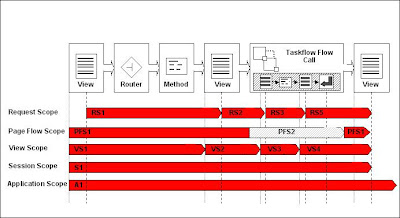
In the Figure, an unbounded task flow consists of a view activity, a router activity, a method call activity, a view activity, a bounded task flow, and a view activity and control flows in that order. There is one private scope per task flow, which is called page flow scope. When the outer task flow is executed, a new page flow scope PSF1 is created for it. When you enter the inner task flow, another page flow scope (i.e., PSF2) is created and PSF1 is suspended. After you exit from the inner task flow, PSF1 of the outer task flow is resumed. A task flow stack is maintained to keep track of the calls from task flow to task flow. An ADF Unbounded Task Flow always logically exists as the first entry on the task flow stack but would simply be empty.

When determining what scope to use for variables within a task flow, you should use any of the scope options other than application or session scope. These two scopes will persist objects in memory beyond the life of the task flow and therefore compromise the encapsulation and reusable aspects of a task flow. In addition, application and session scopes may keep objects in memory longer than needed, causing unneeded overhead.

Reusable components, especially those that are added with multiple instances on a single page, should be bound to per instance scope such as pageFlowScope, viewScope, or backingBean scope. If they are bound to broader scoped beans, many problems could ensue.

When you need to pass data values between activities within a task flow, you should use page flow scope. View scope is recommended for variables that are needed only within the current view activity, not across view activities. Request scope should be used when the scope does not need to persist longer than the current request. Lastly, backing bean scope must be used for backing beans in your task flow if there is a possibility that your task flow will appear in two region components or declarative components on the same page and you would like to achieve region instance isolation.


References


  1. Oracle Fusion Developer Guide by Frank Nimphius and Lynn Munsinger

  2. Creating and Using Managed Beans (if you use ADF Faces components in a standard JSF application)

  3. Using a Managed Bean in a Fusion Web Application (if you use Oracle ADF Model data binding and ADF Controller)

  4. JavaServer Faces (JSF) Tutorial

  5. Backing Bean in JSF Tutorial

  6. Managed Beans in Oracle Fusion Web Applications

© Travel for Life Guide. All Rights Reserved.

Analytical Insights on Health, Culture, and Security.