Cross Column

Showing posts with label Java Classloading. Show all posts

Wednesday, May 25, 2011

Cannot get GATE Home. Pease set it manually!

When you run your application using GATE Embedded, you often run into an error:
  • Cannot get GATE Home. Pease set it manually!
This means that you need to set gate.home property before calling Gate.init(). You can do that in two ways:
  1. In your Java code
    • Gate.setGateHome(File)
  2. In the Java command that launches your program
    • -Dgate.home=path/to/gate/home
GATE also needs to initialize the paths to local files of interest like:
  • Installed plugins home
  • Site configuration file
  • User configuration file
if these are not at their default locations. To help configure these paths, you can use the following system properties:
gate.home
sets the location of the GATE install directory. This should point to the top level directory of your GATE installation. This is the only property that is required. If this is not set, the system will display an error message and them it will attempt to guess the correct value.
gate.plugins.home
points to the location of the directory containing installed plugins (a.k.a. CREOLE directories). If this is not set then the default value of {gate.home}/plugins is used.
gate.site.config
points to the location of the configuration file containing the site-wide options. If not set this will default to {gate.home}/gate.xml. The site configuration file must exist!
gate.user.config
points to the file containing the user’s options. If not specified, or if the specified file does not exist at startup time, the default value of gate.xml (.gate.xml on Unix platforms) in the user’s home directory is used.
load.plugin.path
is a path-like structure, i.e. a list of URLs separated by ‘;’. All directories listed here will be loaded as CREOLE plugins during initialisation. This has similar functionality with the the -d command line option.
gate.builtin.creole.dir
is a URL pointing to the location of GATE’s built-in CREOLE directory. This is the location of the creole.xml file that defines the fundamental GATE resource types, such as documents, document format handlers, controllers and the basic visual resources that make up GATE. The default points to a location inside gate.jar and should not generally need to be overridden.
As described above, the only property that is required is gate.home if you lay out other resources at their default locations.

In this article, we will show you one way to run your GATE application in Oracle WebLogic Server (WLS). This allows you to test your deployed application quickly.

Classloading in Java Platform and Oracle WebLogic Server

If the application you are creating has dependencies on some third-party code (for example, gate.jar), what is the proper way to package these libraries so that they can be used by a portable J2EE application?

In the J2EE platform, there are mechanisms[4] available for including libraries in a portable application:
  1. The WEB-INF/lib Directory
  2. Bundled Optional Classes
  3. Installed Packages (or installed optional packages mechanism)
Since these mechanisms are well-documented, they will not be repeated here.

To use these third-party libraries along with your application code, you face the decision of which packaging mechanism to choose. The decision you make can have major effects on the following:
  • The portability of your application
  • The size of your WAR and EAR files
  • The maintenance of the application
  • Version control as libraries and application servers are updated
Some solutions for packaging library JAR files are specific to a particular application server: for example, placing a library JAR file in an application server's classpath so that applications can use the APIs in that JAR file. Some application servers have container-specific locations where you can place JAR files to be shared by applications and modules. But these mechanisms are not portable, unlike the mechanisms provided by the J2EE platform.

In this article, we will introduce one WLS-specific mechanism to use for the GATE installation. This will allow you to quick-test your GATE application.

In WLS, you can place JAR files to be shared by applications and modules at the following location:
  • $DOMAIN_DIR/lib
This is the domain library directory. The domain library directory is one mechanism that can be used for adding application libraries to the server classpath. The jars located in this directory will be picked up and added dynamically to the end of the server classpath at server startup. The jars will be ordered lexically in the classpath.

It is possible to override the $DOMAIN_DIR/lib directory using the -Dweblogic.ext.dirs system property during startup. This property specifies a list of directories to pick up jars from and dynamically append to the end of the server classpath using java.io.File.pathSeparator as the delimiter between path entries.

Default GATE Installation Layout

The GATE architecture is based on components. Each component (i.e., a Java Beans), is a reusable chunks of software with well-defined interfaces that may be deployed in a variety of contexts.

You can define applications with processing pipelines using these reusable components. In GATE, these resources are officially named CREOLE (i.e., Collection of REusable Objects for Language Engineering). You can read this article to understand how GATE plugins and CREOLE resources are configured.

In the following, we show how GATE's resources are laid out in the WLS' domain library directory:
/wls_domain/lib/gatehome (i.e., GATE's home directory)
+-- lib/
+-- Bib2HTML.jar
+-- GnuGetOpt.jar
+-- ...
+-- plugins/
+-- ANNIE/
+-- ANNIE_with_defaults.gapp
+-- build.xml
+-- creole.xml
+-- resources/
+-- Tools/
+-- build.xml
+-- creole.xml
+-- doc/
+-- resources/
+-- src/
+-- tools.jar
+-- gate .xml

After you've installed GATE's libraries and resources in the domain library directory. The next step you need to do is setting gate.home property in wls_domain/bin/setDomainEnv.sh:

EXTRA_JAVA_PROPERTIES=" ${EXTRA_JAVA_PROPERTIES} -Dweblogic.security.SSL.ignoreHostnameVerification=true -Dgate.home=${DOMAIN_HOME}/lib/gatehome"
export EXTRA_JAVA_PROPERTIES

Final Words


As mentioned before, this is not the best way to configure GATE's installation in a WLS. However, this approach will allow you to test your deployed GATE application quickly on it.

The domain library directory in WLS is intended for JAR files that change infrequently and are required by all or most applications deployed in the server, or by WebLogic Server itself. For example, you might use the lib directory to store third-party utility classes that are required by all deployments in a domain. You can also use it to apply patches to WebLogic Server.

The domain library directory is not recommended as a general-purpose method for sharing a JARs between one or two applications deployed in a domain, or for sharing JARs that need to be updated periodically. If you update a JAR in the lib directory, you must reboot all servers in the domain in order for applications to realize the change. If you need to share a JAR file or Java EE modules among several applications, use the Java EE libraries feature here. Alternatively, you can write custom class loaders to better fit your application's needs.


References
  1. Packaging Utility Classes or Library JAR Files in a Portable J2EE Application
  2. Understanding WebLogic Server Application Classloading
  3. Overview of WebLogic Server Application Classloading
  4. Mechanisms for Using Libraries in J2EE Applications
  5. Class Gate
  6. GATE Embedded
  7. Using System Properties with GATE
  8. GATE Plugins and CREOLE Resources

Saturday, January 15, 2011

WebLogic's Classloading Framework


Updated (09/12/2014):

The FilteringClassLoader provides a mechanism for you to configure deployment descriptors to explicitly specify that certain packages should always be loaded from the application, rather than being loaded by the system classloader. To understand the default class loader structure in WLS 12.1.3, read here.

System (D)
  |
  FilteringClassLoader (filterList := x.y.*) (C)
   |
  App (B)
   |
  Web (A)

Running any application on a JVM or an application server (e.g., WebLogic Server), the main question a designer faces is:
  • Which class is getting loaded from which source
A classloader is used by the JVM to locate and load Java classes into memory at runtime. Java classloaders define a hierarchy, a tree-like collection of parent and child classloaders.

In this article, we will look at two classloader hierarchies:
  • Java Classloader Hierarchy
    • Applied to regular Java applications running from command line
  • Application Classloader Hierarchy
    • We will look at one such hierarchy implemented by WebLogic's Classloading Framework

Three Principles of Java Classloader Operation

Classloader hierarchy plays an important role when locating and loading classes into memory.  There are only three basic principles to understand:
  1. Delegation Principle
    • If a class is not loaded already, the classloaders delegate the request to load that class to their parent classloaders (see also [11]).
      • In other words, a child classloader loads a class only if its parent fails to load it
      • See customization section for an exception that is supported by WebLogic Server to override this default behavior by setting the prefer-web-inf-classes element to true in the weblogic.xml descriptor file.
  2. Visibility Principle
    • Classes loaded by parent classloaders are visible to child classloaders but not vice versa
    • A classloader cannot access any classes loaded by a sibling classloader.
  3. Uniqueness Principle
    • When a classloader loads a class, the child classloaders in the hierarchy will never reload that class.
The application that triggered the request to load a class receives a ClassNotFoundException or NoClassDefFoundError [7]if neither the classloader nor any of its ancestors can locate the class.

Java Classloader Hierarchy


Regular Java applications running from command line involve three classloaders:
  1. Bootstrap classloader (root)
    • Created by the JVM for loading its internal classes and the java.* packages (i.e., core Java libraries under /lib directory) included within the JVM
    • Written in native code
    • Endorsed-standards override mechanism allows a jar file containing a newer implementation of an endorsed standard or standalone API be installed into a run-time image by placing it in one of the directories named by the system property (i.e., java.endorsed.dirs), or by placing it in the default lib/endorsed directory if the system property is not defined. 
      • Such jar files are prepended to the JVM's bootstrap class path at run time, thereby overriding any definitions stored in the run-time system itself.
  2. Extensions classloader (child of bootstrap classloader)
    • Loads any JARs placed in the extensions directory (/lib/ext or any other directory specified by the java.ext.dirs system property) of the JDK
    • Implemented by the sun.misc.Launcher$ExtClassLoader class
    • Extension classes cannot override the JDK classes loaded by the bootstrap loader but they are loaded in preference to classes defined by the system loader and its descendants.
  3. System classloader (child of extensions classloader)
    • Loads code found on java.class.path, which maps to the system CLASSPATH variable.
    • Implemented by the sun.misc.Launcher$AppClassLoader class
    • Any custom classloader created by an application, including WebLogic's classloaders, are all descendants of this system classpath classloader
    • Can be programmatically accessible as ClassLoader.getSystemClassLoader()
    • Is also known as application class loader
In J2EE, each application is packaged as an Enterprise ARchive (EAR) and each EAR gets its own classloader. The J2EE classloader hierarchy supported by a specific framework could include the above-mentioned classloaders and more[6]. J2EE application servers utilize sophisticated classloader hierarchies for features like Java Naming and Directory Interface (JNDI), thread pooling, component hot redeployment, and so on.  In this article, we will introduce one such Application Classloader Hierarchy implemented by WebLogic's classloading framework.

WebLogic's Classloading Framework

WebLogic's standard classloading framework needs to achieve two main goals:
  1. Maintain application independence
    • Classes used by application A must never come in conflict with any classes used by application B
    • Redeploying application A must have no effect on classes used by application B
  2. Hot-deploy or hot-redeploy
    • Within an application, it must allow you to redeploy web applications without having to redeploy the EJBs
    • It is more common to change JSP files and servlets than to change the EJB tier. With proper design, a separate classloader can be created for each servlet and JSP page. This allows you to reload individual servlets and JSPs easily, without the need for redeploying the web application or affecting any of the EJBs.
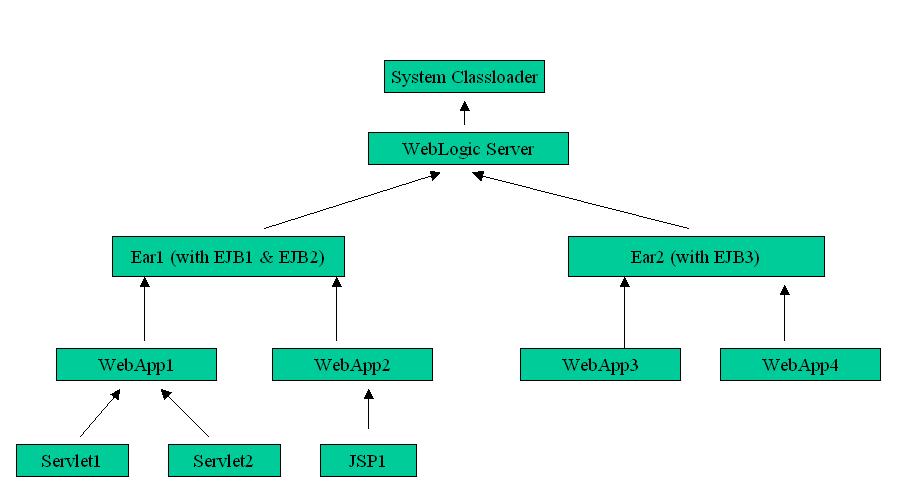
WebLogic achieves the first goals by creating a separate classloader hierarchy for each application deployed to the server. The parent of this hierarchy is the system classpath classloader. By creating a separate classloader hierarchy for each application, classloaders associated with one application cannot see the classloaders or classes of another application, and because sibling classloaders are isolated from each other, this also isolates the applications.

Java classloaders do not have any standard mechanism to undeploy or unload a set of classes, nor can they load new versions of classes. To achieve the second goal, each application in WebLogic Server has a hierarchy of classloaders (see the Figure below) that are offspring of the system classloader. These hierarchies allow applications or parts of applications to be individually reloaded without affecting the rest of the system. To find out more details on this, read WebLogic Server Application Classloading.


Customization

Even with good support from either Java classloading framework or WebLogic's application classloading framework, it often comes times that you need to have better control over which modules are reloadable, which classes are visible between modules, etc.

There are multiple solutions to your customization needs:
  1. You can configure a web application classloader so that it doesn't use the default parent delegation scheme by setting the prefer-web-inf-classes element to true in the weblogic.xml descriptor file. See details here.
  2. The FilteringClassLoader provides a mechanism for you to configure deployment descriptors to explicitly specify that certain packages should always be loaded from the application, rather than being loaded by the system classloader. See details here.
  3. You can create custom classloader hierarchies for an application allowing for better control over class visibility and reloadability. You achieve this by defining a classloader-structure element in the weblogic-application.xml deployment descriptor file. See details here.

Wrap-up

More often than not, you want class definitions (which are stable) shared across applications. To facilitate sharing, you would place them at higher level of the classloading hierarchy (for example, getting loaded at system classloader instead of at application classloader).

If it is common to change some modules, a separate classloader can be created for them and place them at the tip of the classloading tree. This allows you to reload individual modules easily, without the need for redeploying their parent applications.

When loading a resource dynamically, you can choose from at least three classloaders: the system classloader, the current classloader, and the current thread context classloader. Which classloader is the right one?  You can read [8] to find the answer.

References

  1. Classloader
  2. JRebel
  3. Understanding WebLogic Server Application Classloading
  4. WebLogic: The Definitive Guide
  5. WebLogic Server 11g for ADF/Forms Developers
  6. Classloaders and J2EE (good) 
  7. 3 ways to resolve NoClassDefFoundError in Java
  8. Find a way out of the ClassLoader maze 
  9. Professional Oracle WebLogic Server by Robert Patrick, Gregory Nyberg, and Philip Aston
  10. VM Class Loading
  11. Using 3rd party JDBC Jar Files
    • The general precedence of jar files in the classpath is the following:
    • Note that the above doesn't consider library-ref or prefer-application-packages (see article for details).
  12. WebLogic class loader - analysis and configuration options  (good)
  13. JEP 220: Modular Run-Time Images

© Travel for Life Guide. All Rights Reserved.

Analytical Insights on Health, Culture, and Security.