Cross Column

Showing posts with label Semantic Technologies. Show all posts

Wednesday, July 13, 2011

Language Identification

Language identification is one of the supervised learning method. In this article, we will cover a specific Processing Resource (PR) in GATE (i.e., TextCat or Language Identification PR). Based on its documentation, it says that it:

Recognizes the document language using TextCat. Possible languages: german, english, french, spanish, italian, swedish, polish, dutch, norwegian, finnish, albanian, slovakian, slovenian, danish, hungarian.

N-Gram-Based Text Categorization

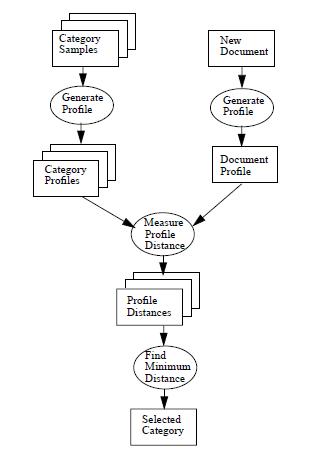
TextCat PR uses N-Gram for text categorization. You can find the details from this article. See the following diagram for its data flow.


There are two phases in the language identification task:
  1. Training
  2. Application

We'll discuss those in the following sections.

Training Phase

In the training phase, the goal is to generate category profiles from the given category samples. In Language Identification PR (or TextCat PR), the categories are languages. So, we take document samples from different languages (i.e., English, German, etc.) and use them to generate category profiles.

These category profiles are already provided in TextCat PR. At runtime, TextCat PR looks for a configuration file named textcat.conf. This files has the following content:

language_fp/german.lm    german
language_fp/english.lm english
language_fp/french.lm french
language_fp/spanish.lm spanish
language_fp/italian.lm italian
language_fp/swedish.lm swedish
language_fp/polish.lm polish
language_fp/dutch.lm dutch
language_fp/norwegian.lm norwegian
language_fp/finnish.lm finnish
language_fp/albanian.lm albanian
language_fp/slovak-ascii.lm slovakian
language_fp/slovenian-ascii.lm slovenian
language_fp/danish.lm danish
language_fp/hungarian.lm hungarian

In a sub-folder named language_fp which is relative to the location of textcat.conf, there are multiple category profile files with lm suffix. For example, german.lm is the category profile for German and english.lm is the category profile for English.

Using English profile as an example, its content looks like this:

_     20326
e 6617
t 4843
o 3834
n 3653
i 3602
a 3433
s 2945
r 2921
h 2507
e_ 2000
d 1816
_t 1785
c 1639
l 1635
th 1535
he 1351
_th 1333
...

On each line, there are two elements:

  • N-gram (N is from 1 to 5)
  • Frequency

N-grams are sorted in the reverse order of frequency. For example, the most frequently found character in English documents is the space character (i.e., represented by '_') whose count of occurrences is 20326. From the training data, we also find that the most frequently found 2-gram is 'e_' (i.e., letter 'e' followed by a space).

Application Phase


In the application phase, the TextCat PR reads the learned model (i.e., category profiles ) and then applies the model to the data. Given a new document, first we generate a document profile (i.e., N-grams frequency profile) similar to the category profiles.

The language classification task is then to measure profile distance: For each N-gram in the document profile, we find its counterpart in the category profile, and then calculate how far out of place it is.

Finally, the bubble labelled "Find Minimum Distance" simply takes the distance measures from all of the category profiles to the document profile, and picks the smallest one.

What's in TextCat PR?

If you look inside the textcat-1.0.1.jar, you can identify the following structure:

org/
+--knallgrau/
+--utils/
+-- textcat/
+-- FingerPrint.java
+-- MyProperties.java
+-- NGramEntryComparator.java
+-- TextCategorizer.java
+-- textcat.conf
+-- language_fp/
+-- english.lm
+-- german.lm
+-- ...

Unfortunately, you cannot find the above source files from GATE's downloads. However, after Google search, I've found them from Google Code here.

Sunday, June 19, 2011

How to Support Property Chain Axiom Using Oracle's OWL Prime

In this article, we will show how to support Property Chain Axiom using OWLPrime rulebase in Oracle Semantic Technologies.
What Oracle Semantic Supports?
Oracle Semantic Technologies support the following rule set (but not limited to these):
  • OWLSIF (OWL with IF semantics)
    • Based on Dr. Horst's pD* vocabulary
  • OWLPrime
  • OWL2RL

If you are using 11.2.0.1, you can find OWl 2 RL support in the following patch on support.oracle.com:

  • Patch Number 9819833 - semantic technologies 11g r2 fix bundle 2

Note that Semantic 11.2.0.2 comes with OWl 2 RL support.

Property Chain Axiom[5]

Table 1 specifies the semantic conditions on property chain axiom:


If
Then
prp-spo2 T(?p, owl:propertyChainAxiom, ?x)
LIST[?x, ?p1, ..., ?pn]
T(?u1, ?p1, ?u2)
T(?u2, ?p2, ?u3)
...
T(?un, ?pn, ?un+1)
T(?u1, ?p, ?un+1)
Property chain axiom allows reasoner to infer the existence of a property from a chain of properties. For example, the following hasContained semantic using property chain axiom :
hasContained(x, "EOS 60D") ^ rdf:type("EOS 60D","Digital SLR Cameras")
-> hasContained(x,"Cameras")

<rdf:description about="hasContained">
<owl:propertychainaxiom parsetype="Collection"/>
<owl:objectproperty about="hasContained"/>
<owl:objectproperty about="&rdf;type">
</owl:propertychainaxiom>
</rdf:description>
to derive the fact that an article is related to the topic "Cameras" if it contains the key words "EOS 60D" because "EOS 60D" is a rdf:type of "Digital SLR Cameras" which is, in turn, a owl:subClassOf of "Cameras". Our camera ontology example looks like this:

Using Oracle's OWLPrime rule set, it doesn't support the above inference directly. What it can infer is just:
rdf:type("EOS 60D", "Digital SLR Cameras") ^
owl:subClassOf("Digital SLR Cameras","Cameras") -> rdf:type("EOS 60D","Cameras")
However, this is different from what we want. To enable Oracle Semantic to support what we want using OWLPrime rule set, we need to:
  • Specify chain definition RDF triples
  • Specify 'CHAIN' for the inf_components_in argument in SEM_APIS.CREATE_ENTAILMENT()
Note that OWL2RL has more rules than OWLPrime does and you can use it to achieve the above task directly. However, the more rules you include in the inference, the slower performance you get. That's the reason why we document the steps here to allow users to use OWLPrime instead of OWL2RL for property chain.

Chain Definition Triples

The first requirement is to insert the necessary chain definition triples for hasContained semantic into your ontology model:

prefix prop:, namespace URI: http://xmlns.oracle.com/rdfctx/property#
prefix owl:, namespace URI: http://www.w3.org/2002/07/owl#
prefix rdf:, namespace URI: http://www.w3.org/1999/02/22-rdf-syntax-ns#
prop:hasContained  owl:propertyChainAxiom _:jA1 .
_:jA1 rdf:first prop:hasContained .
_:jA1 rdf:rest _:jA2.
_:jA2 rdf:first rdf:type .
_:jA2 rdf:rest rdf:nil .
To insert the above chain definition triples, you can use the following INSERT statements:
INSERT INTO ontology_rdf_data VALUES(ONTOLOGY_S1.nextval,
sdo_rdf_triple_s('ontology_model',
'<http://xmlns.oracle.com/rdfctx/property#hasContained>',
'<http://www.w3.org/2002/07/owl#propertyChainAxiom>',
'_:jA1'));

INSERT INTO ontology_rdf_data VALUES(ONTOLOGY_S1.nextval,
sdo_rdf_triple_s('ontology_model','_:jA1',
'<http://www.w3.org/1999/02/22-rdf-syntax-ns#first>',
'<http://xmlns.oracle.com/rdfctx/property#hasContained>'));

INSERT INTO ontology_rdf_data VALUES(ONTOLOGY_S1.nextval,
sdo_rdf_triple_s('ontology_model',
'_:jA1', '<http://www.w3.org/1999/02/22-rdf-syntax-ns#rest>',
'_:jA2'));

INSERT INTO ontology_rdf_data VALUES(ONTOLOGY_S1.nextval,
sdo_rdf_triple_s('ontology_model','_:jA2',
'<http://www.w3.org/1999/02/22-rdf-syntax-ns#first>',
'<http://www.w3.org/1999/02/22-rdf-syntax-ns#type>'));

INSERT INTO ontology_rdf_data VALUES(ONTOLOGY_S1.nextval,
sdo_rdf_triple_s('ontology_model',
'_:jA2', '<http://www.w3.org/1999/02/22-rdf-syntax-ns#rest>',
'<http://www.w3.org/1999/02/22-rdf-syntax-ns#nil>'));
Note that our ontology_model is created as:
-- create application table
create table ontology_rdf_data (
triple_id NUMBER(18) NOT NULL,
triple SDO_RDF_TRIPLE_S,
CONSTRAINT ontology_rdf_data_pk PRIMARY KEY (triple_id)
);

-- create the RDF Model --
begin
sem_apis.create_rdf_model (model_name => 'ontology_model',
table_name => 'ontology_rdf_data',
column_name => 'triple');
end;
/

SEM_APIS.CREATE_ENTAILMENT

Before you use SEM_MATCH table function to query semantic data, it is required that you create a rules index using SEM_APIS.CREATE_ENTAILMENT. The rules index will contain precomputed triples inferred from RDF model(s) and rulebase(s).

Here we describe how to set up rules index correctly for supporting property chain. First, if you have already created the rules index, drop it first:
BEGIN
SEM_APIS.DROP_ENTAILMENT('rule_index_1');
END;
/

The second step is to run inference on default graph:

exec sem_apis.create_entailment('rule_index_1',sem_models('ontology_model','model_1'),sem_rulebases('owlprime'),inf_components_in => 'CHAIN', include_default_g => sem_models('ontology_model','model_1'));

Finally, you run NG-based (i.e., Name Graph) local inference:

exec sem_apis.create_entailment('rule_index_1',sem_models('ontology_model','model_1'),sem_rulebases('owlprime'), inf_components_in => 'CHAIN', options =>'ENTAIL_ANYWAY=T,LOCAL_NG_INF=T');
commit;

Unless you specify below argument
inf_components_in => 'CHAIN'
the reasoner won't support property chain using OWLPrime rulebase.

Note that there are two RDF models used in the above global and local inference(s):
  • ontology_model (i.e., TBox)
  • model_1 (i.e., ABox)

Global Inference vs. Local Inference
Global inference takes all asserted triples from all the source model(s) provided and applies semantic rules on top of all the asserted triples till an inference closure is reached. Even if the given source models contain one more multiple named graphs, it actually makes no difference to global inference because all assertions, whether part of a named graph or not, are treated the same as if they come from a single graph.

On the other hand, local inference is performed within the boundary of every single named graph combined with the common schema. See Oracle documentation for more details.

References
  1. OWL 2 Web Ontology Language Profiles
  2. Oracle's Support for a Subset of the Web Ontology Language (OWL)
  3. The Fragment of OWL Implemented in Oracle 11g
  4. rdf:type
  5. Property Chains
  6. SKOS (part 4): property chains

Sunday, May 29, 2011

Java Annotation Patterns Engine (JAPE)

In this article, we will introduce the Java Annotation Patterns Engine (JAPE), a component of the open-source General Architecture for Text Engineering (GATE) platform.

Example of JAPE Grammar

See below for an example of JAPE grammar (by convention, file type of jape). And see the detailed descriptions of its components in later sections. The context under which this grammar will be executed includes:
  • doc —Implements gate.Document interface. JAPE rules always work on an input annotation set associated with a specific document.
  • inputAS —Implements gate.AnnotationSet interface and represents the input annotation set.
  • outputAS - Implements gate.AnnotationSet interface and represents the output annotation set.
  • ontology - Implements gate.creole.ontology.Ontology interface, which can be used in language analyzing.
// Valentin Tablan, 29/06/2001
// $id$


Phase:postprocess
Input: Token SpaceToken
Options: control = appelt debug = true

// CR+LF | CR |LF+CR -> One single SpaceToken
Rule: NewLine
(
({SpaceToken.string=="\n"}) |
({SpaceToken.string=="\r"}) |
({SpaceToken.string=="\n"}{SpaceToken.string=="\r"}) |
({SpaceToken.string=="\r"}{SpaceToken.string=="\n"})
):left
-->
{
gate.AnnotationSet toRemove = (gate.AnnotationSet)bindings.get("left");
outputAS.removeAll(toRemove);
//get the tokens
java.util.ArrayList tokens = new java.util.ArrayList(toRemove);
//define a comparator for annotations by start offset
Collections.sort(tokens, new gate.util.OffsetComparator());
String text = "";
Iterator tokIter = tokens.iterator();
while(tokIter.hasNext())
text += (String)((Annotation)tokIter.next()).getFeatures().get("string");

gate.FeatureMap features = Factory.newFeatureMap();
features.put("kind", "control");
features.put("string", text);
features.put("length", Integer.toString(text.length()));
outputAS.add(toRemove.firstNode(), toRemove.lastNode(), "SpaceToken", features);
}

What's JAPE?

JAPE is a finite state transducer that operates over annotations based on regular expressions. Thus it is useful for pattern-matching, semantic extraction, and many other operations over syntactic trees such as those produced by natural language parsers.

A JAPE grammar consists of a set of phases, each of which consists of a set of pattern/action rules. The phases run sequentially and constitute a cascade of finite state transducers over annotations. One of the main reasons for using a sequence of phases is that a pattern can only be used once in each phase, but it can be reused in a later phase.

Input annotations could be specified at the beginning of the grammar. This specifies what types of annotations will be processed by the rules of grammar. Other not-mentioned types will be ignored. By default the transducer will include Token, SpaceToken and Lookup.

Options specification defines the method of rule matching (i.e., control) and debug flag for the rules (i.e., debug) in the grammar. There are five control styles:
  • brill — When more than one rule matches the same region of the document, they all are fired.
  • all — Similar to brill, in that it will also execute all matching rules, but the matching will continue from the next offset to the current one.
  • first — With the first style, a rule fires for the first match that‘s found.
  • once — Once a rule has fired, the whole JAPE phase exits after the first match.
  • appelt — Only one rule can be fired for the same region of text, according to a set of priority rules. The appelt control style is the most appropriate for named entity recognition as under appelt only one rule can fire for the same pattern.
If debug is set to true, any rule-firing conflicts will be displayed in the messages window if the grammar is running in appelt mode and there is more than one possible match.

Following the declaration portions of grammar, a list of rules are specified. Each rule consists of a left-hand-side (LHS) and a right-hand-side (RHS). The LHS of the rules consists of an annotation pattern description. The RHS consists of annotation manipulation statements. Annotations matched on the LHS of a rule may be referred to on the RHS by means of labels that are attached to pattern elements.

LHS

LHS contains annotation pattern that may contain regular expression operators e.g. ("+", "?" , "*"). However, you should avoid the use of “*” based regular expressions for better performance.

There are 3 main ways in which the pattern can be specified:
  • As a string of text
    • e.g., {Token.string == "Oracle"}
    • This pattern matches a string of text with the value of "Oracle".
  • As the attributes (and values) of an annotation
    • e.g., ({Token.kind == word, Token.category == NNP, Token.orth == upperInitial})?
    • The above pattern uses the Part of Speech (POS) annotation where kind=word, category=NNP and orth=upperInitial.
  • As an annotation previously assigned from a gazetteer, tokeniser, or other module
    • ({Company})?:c1 ({Positives}):v ({Company})?:c2 ({Split}|{CC})?
    • The above pattern matches annotations of Company type, followed by annotations of Positives type, etc. The first-matched pattern element is labeled as c1, the second-matched pattern element is labeled as v, etc.
There are different kind of operators supported:
  • Equality operators (“==” and “!=”)
    • {Token.kind == "number"}, {Token.length != 4}
  • Comparison operators (“<”, “<=”, “>=” and “>”)
    • {Token.string > "aardvark"}, {Token.length < 10}
  • Regular expression operators (“=~”, “==~”, “!~” and “!=~”)
    • {Token.string =~ "[Dd]ogs"}, {Token.string !~ "(?i)hello"}
    • ==~ and !=~ are also provided, for whole-string matching
  • {X contains Y} and {X within Y} for checking annotations within the context of other annotations
You can even define custom operators by implementing gate.jape.constraint.ConstraintPredicate.

RHS

The right-hand-side (RHS) consists of annotation manipulation statements. For example, you can add/remove/update annotations associated with a document. Alternatively, RHS can contain Java code to create or manipulate annotations. In this article, we will focus only on RHS' implemented in Java code.

On the RHS, Java code can reference the following variables (which are passed as parameters to the RHS action):
  • doc
  • bindings
  • annotations
  • inputAS
  • outputAS
  • ontology
annotations is provided for backward compatibility and should not be used for new implementations. inputAS and outputAS represent the input and output annotation set. Normally, these would be the same (by default when using ANNIE, these will be the “Default” annotation set) . However, the user is at liberty to change the input and output annotation sets in the parameters of the JAPE transducer at runtime. Therefore, it cannot be guaranteed that the input and output annotation sets will be the same, and we should specify the annotation set we are referring to.

Annotations matched on the LHS of a rule may be referred to on the RHS by means of labels that are attached to pattern elements. They can be retrieved by using bindings as follows:
gate.AnnotationSet toRemove = (gate.AnnotationSet)bindings.get("c1");
This returns a temporary annotation set which holds all the annotations matched on the LHS that have been labeled as "c1."

In the following discussions, we assume you use ANNIE and both inputAS and outputAS points to the same annotation set.

On the RHS, you can do any of the following:
  • Remove annotations from document's annotation set(s)
  • Update annotations in document's annotation set(s)
  • Add new annotations to document's annotation set(s)
However, if you try to remove annotations while using the same iterator for other tasks at the same time, you may see:
  • java.util.ConcurrentModificationException
The solution is to collect all to-be-removed annotations on a list and process them at the end.

RhsAction

To understand the RHS action, you need to know how a JAPE rule is translated to its executable binary in Java. For example, rule ConjunctionIdentifier2

Rule: ConjunctionIdentifier2
(
({Token.category=="CC"}):conj2
)
-->
:conj2
{

gate.AnnotationSet matchedAnns= (gate.AnnotationSet) bindings.get("conj2");
gate.FeatureMap newFeatures= Factory.newFeatureMap();
newFeatures.put("rule","ConjunctionIdentifierr21");
outputAS.add(matchedAnns.firstNode(),matchedAnns.lastNode(),"CC", newFeatures);
}

will be translated into:
1  // ConjunctionIdentifierConjunctionIdentifier2ActionClass14
2 package japeactionclasses;
3 import java.io.*;
4 import java.util.*;
5 import gate.*;
6 import gate.jape.*;
7 import gate.creole.ontology.*;
8 import gate.annotation.*;
9 import gate.util.*;
10
11 public class ConjunctionIdentifierConjunctionIdentifier2ActionClass14
12 implements java.io.Serializable, RhsAction {
13 public void doit(gate.Document doc,
14 java.util.Map bindings,
15 gate.AnnotationSet annotations,
16 gate.AnnotationSet inputAS, gate.AnnotationSet outputAS,
17 gate.creole.ontology.Ontology ontology) throws gate.jape.JapeException {
18 gate.AnnotationSet conj2Annots = bindings.get("conj2");
19 if(conj2Annots != null && conj2Annots.size() != 0) {
20
21
22 gate.AnnotationSet matchedAnns= (gate.AnnotationSet) bindings.get("conj2");
23 gate.FeatureMap newFeatures= Factory.newFeatureMap();
24 newFeatures.put.("rule","ConjunctionIdentifierr21");
25 outputAS.add(matchedAnns.firstNode(),matchedAnns.lastNode(),"CC", newFeatures);
26
27 }
28 }
29 }

Notice that RHS of the rule is wrapped into doit method which has the following signature:
public void doit(gate.Document doc,
java.util.Map bindings,
gate.AnnotationSet annotations,
gate.AnnotationSet inputAS, gate.AnnotationSet outputAS,
gate.creole.ontology.Ontology ontology)

That's why you can reference:
  • doc
  • bindings
  • annotations
  • inputAS
  • outputAS
  • ontology
without declaring them.

Also notice that the return type of doit method is void. It means that you can exit from the middle of action execution by issuing a return statement:
if (annotation.getFeatures().get("tagged") != null)
return;


References
  1. JAPE (linguistics)
  2. GATE JAPE Grammar Tutorial
  3. JAPE: Regular Expressions over Annotations

Wednesday, May 25, 2011

Cannot get GATE Home. Pease set it manually!

When you run your application using GATE Embedded, you often run into an error:
  • Cannot get GATE Home. Pease set it manually!
This means that you need to set gate.home property before calling Gate.init(). You can do that in two ways:
  1. In your Java code
    • Gate.setGateHome(File)
  2. In the Java command that launches your program
    • -Dgate.home=path/to/gate/home
GATE also needs to initialize the paths to local files of interest like:
  • Installed plugins home
  • Site configuration file
  • User configuration file
if these are not at their default locations. To help configure these paths, you can use the following system properties:
gate.home
sets the location of the GATE install directory. This should point to the top level directory of your GATE installation. This is the only property that is required. If this is not set, the system will display an error message and them it will attempt to guess the correct value.
gate.plugins.home
points to the location of the directory containing installed plugins (a.k.a. CREOLE directories). If this is not set then the default value of {gate.home}/plugins is used.
gate.site.config
points to the location of the configuration file containing the site-wide options. If not set this will default to {gate.home}/gate.xml. The site configuration file must exist!
gate.user.config
points to the file containing the user’s options. If not specified, or if the specified file does not exist at startup time, the default value of gate.xml (.gate.xml on Unix platforms) in the user’s home directory is used.
load.plugin.path
is a path-like structure, i.e. a list of URLs separated by ‘;’. All directories listed here will be loaded as CREOLE plugins during initialisation. This has similar functionality with the the -d command line option.
gate.builtin.creole.dir
is a URL pointing to the location of GATE’s built-in CREOLE directory. This is the location of the creole.xml file that defines the fundamental GATE resource types, such as documents, document format handlers, controllers and the basic visual resources that make up GATE. The default points to a location inside gate.jar and should not generally need to be overridden.
As described above, the only property that is required is gate.home if you lay out other resources at their default locations.

In this article, we will show you one way to run your GATE application in Oracle WebLogic Server (WLS). This allows you to test your deployed application quickly.

Classloading in Java Platform and Oracle WebLogic Server

If the application you are creating has dependencies on some third-party code (for example, gate.jar), what is the proper way to package these libraries so that they can be used by a portable J2EE application?

In the J2EE platform, there are mechanisms[4] available for including libraries in a portable application:
  1. The WEB-INF/lib Directory
  2. Bundled Optional Classes
  3. Installed Packages (or installed optional packages mechanism)
Since these mechanisms are well-documented, they will not be repeated here.

To use these third-party libraries along with your application code, you face the decision of which packaging mechanism to choose. The decision you make can have major effects on the following:
  • The portability of your application
  • The size of your WAR and EAR files
  • The maintenance of the application
  • Version control as libraries and application servers are updated
Some solutions for packaging library JAR files are specific to a particular application server: for example, placing a library JAR file in an application server's classpath so that applications can use the APIs in that JAR file. Some application servers have container-specific locations where you can place JAR files to be shared by applications and modules. But these mechanisms are not portable, unlike the mechanisms provided by the J2EE platform.

In this article, we will introduce one WLS-specific mechanism to use for the GATE installation. This will allow you to quick-test your GATE application.

In WLS, you can place JAR files to be shared by applications and modules at the following location:
  • $DOMAIN_DIR/lib
This is the domain library directory. The domain library directory is one mechanism that can be used for adding application libraries to the server classpath. The jars located in this directory will be picked up and added dynamically to the end of the server classpath at server startup. The jars will be ordered lexically in the classpath.

It is possible to override the $DOMAIN_DIR/lib directory using the -Dweblogic.ext.dirs system property during startup. This property specifies a list of directories to pick up jars from and dynamically append to the end of the server classpath using java.io.File.pathSeparator as the delimiter between path entries.

Default GATE Installation Layout

The GATE architecture is based on components. Each component (i.e., a Java Beans), is a reusable chunks of software with well-defined interfaces that may be deployed in a variety of contexts.

You can define applications with processing pipelines using these reusable components. In GATE, these resources are officially named CREOLE (i.e., Collection of REusable Objects for Language Engineering). You can read this article to understand how GATE plugins and CREOLE resources are configured.

In the following, we show how GATE's resources are laid out in the WLS' domain library directory:
/wls_domain/lib/gatehome (i.e., GATE's home directory)
+-- lib/
+-- Bib2HTML.jar
+-- GnuGetOpt.jar
+-- ...
+-- plugins/
+-- ANNIE/
+-- ANNIE_with_defaults.gapp
+-- build.xml
+-- creole.xml
+-- resources/
+-- Tools/
+-- build.xml
+-- creole.xml
+-- doc/
+-- resources/
+-- src/
+-- tools.jar
+-- gate .xml

After you've installed GATE's libraries and resources in the domain library directory. The next step you need to do is setting gate.home property in wls_domain/bin/setDomainEnv.sh:

EXTRA_JAVA_PROPERTIES=" ${EXTRA_JAVA_PROPERTIES} -Dweblogic.security.SSL.ignoreHostnameVerification=true -Dgate.home=${DOMAIN_HOME}/lib/gatehome"
export EXTRA_JAVA_PROPERTIES

Final Words


As mentioned before, this is not the best way to configure GATE's installation in a WLS. However, this approach will allow you to test your deployed GATE application quickly on it.

The domain library directory in WLS is intended for JAR files that change infrequently and are required by all or most applications deployed in the server, or by WebLogic Server itself. For example, you might use the lib directory to store third-party utility classes that are required by all deployments in a domain. You can also use it to apply patches to WebLogic Server.

The domain library directory is not recommended as a general-purpose method for sharing a JARs between one or two applications deployed in a domain, or for sharing JARs that need to be updated periodically. If you update a JAR in the lib directory, you must reboot all servers in the domain in order for applications to realize the change. If you need to share a JAR file or Java EE modules among several applications, use the Java EE libraries feature here. Alternatively, you can write custom class loaders to better fit your application's needs.


References
  1. Packaging Utility Classes or Library JAR Files in a Portable J2EE Application
  2. Understanding WebLogic Server Application Classloading
  3. Overview of WebLogic Server Application Classloading
  4. Mechanisms for Using Libraries in J2EE Applications
  5. Class Gate
  6. GATE Embedded
  7. Using System Properties with GATE
  8. GATE Plugins and CREOLE Resources

Wednesday, March 9, 2011

GATE Plugins and CREOLE Resources

GATE (or General Architecture for Text Engineering) is very extensible. Its architecture is based on components (or resources). Its framework functions as a backplane into which users can plug components.

Each component (i.e., a Java Beans), is a reusable chunks of software with well-defined interfaces that may be deployed in a variety of contexts. You can define applications with processing pipelines using these reusable components. In GATE, these resources are officially named CREOLE (i.e., Collection of REusable Objects for Language Engineering).

A set of components plus the framework is a deployment unit which can be embedded in user's applications.

CREOLE Resources

GATE components are one of three types:

  1. Language Resources (LRs) represent entities such as lexicons (e.g. Word-Net), corpora or ontologies
  2. Processing Resources (PRs) represent entities that are primarily algorithmic, such as parsers, generators or n-gram modellers
  3. Visual Resources (VRs) represent visualisation and editing components that participate in GUI
To better organize CREOLE resources, CREOLE plugins are used. In other words, resource implementations can be grouped together as ‘plugins’ and stored at a URL. When the resources are stored in the local file system, this can be a file URL (i.e. file:///D:/Gate/Workspace/GoldFish/) .

CREOLE Plugins

To create a CREOLE plugin, you layout its contents in a directory. Within the directory, it can have a jar which holds its resource implementation, a configuration file (i.e., creole.xml), and external resources such as rules, gazetteer lists, schemas, etc in a resources folder.

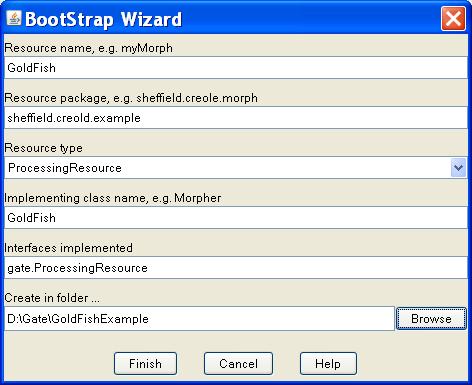
To create one, you can use BootStrap Wizard in GATE Developer. For example, we create a new plugin with a single Processing Resource named GoldFish as shown below:


The following files and directories are created:
GoldFish/

+-- src/
put all your Java sources in here.
+-- resources/
any external files used by your plugin (e.g. configuration files,
JAPE grammars, gazetteer lists, etc.) go in here.
+-- build.xml
Ant build file for building your plugin.
+-- build.properties
property definitions that control the build process go in here,
in particular, make sure that gate.home points to your copy of GATE.
+-- creole.xml
plugin configuration file for GATE - edit this to add parameters, etc.,
for your resources.

Using CREOLE Resources

In the applications using GATE Embedded, you can contruct an information extraction (or IE) pipeline using CREOLE resources from different CREOLE plugins. For example, in the Gold Fish example, it constructs a pipeline (i.e., SerialAnalyserController) using three different PRs:
String[] processingResources = {
"gate.creole.tokeniser.DefaultTokeniser",
"gate.creole.splitter.SentenceSplitter",
"sheffield.creole.example.GoldFish"};
SerialAnalyserController pipeline = (SerialAnalyserController)Factory
.createResource("gate.creole.SerialAnalyserController");

for(int pr = 0; pr <processingResource.length; pr++) {
System.out.print("\t* Loading " + processingResource[pr] + " ... ");
pipeline.add((gate.LanguageAnalyser)Factory
.createResource(processingResource[pr]));
}

Two of them are provided by ANNIE plugin and the third one (i.e., sheffield.creole.example.GoldFish) is provided by GoldFish plugin.

In order to use a CREOLE resource, the relevant CREOLE plugin must be loaded. For example, in the Gold Fish Example, it loads two plugins as follows:
// Load GlodFish plugin
Gate.getCreoleRegister().registerDirectories(
new File(System.getProperty("user.dir")).toURI().toURL());
// Load ANNIE plugin for the Defaulttokeniser and SentenceSplitter
Gate.getCreoleRegister().registerDirectories(
new File(Gate.getPluginsHome(), ANNIEConstants.PLUGIN_DIR).toURI().toURL());

Note that all CREOLE resources (i.e., LRs, PRs, and VRs) require that the appropriate plugin be first loaded. The only exceptions are: Document, Corpus or DataStore. For those, you do not need to first load a plugin.

In the above statements, we use registerDirectories() API to load plugins from a given CREOLE directory URL. Note that CREOLE directory URLs should point to the parent location of the creole.xml file.

When a plugin is loaded into GATE it looks for a configuration file called creole.xml relative to the plugin URL and uses the contents of this file to determine what resources this plugin declares and where to find the classes that implement the resource types (typically these classes are stored in a JAR file in the plugin directory).

In the next sections, we will examine the structures of two CREOLE plugins:

  1. ANNIE plugin
  2. GoldFish plugin

ANNIE Plugin

ANNIE plugin has the following layout:
/plugins/ANNIE/ (i.e., ANNIE's plugin directory)
+-- resources/
+-- BengaliNE/
+-- gazeteer/
+-- heptag/
+-- NE/
+-- othomatcher/
+-- regex-splitter/
+-- schema/
+-- sentenceSplitter/
+-- tokenizer/
+-- VP/
+-- build.xml
+-- creole.xml

From creole.xml (i.e., plugin configuration file), we can find the following resources declared:

  • Annotation Schema
  • PRs
    • GATE Unicode Tokeniser
    • ANNIE English Tokeniser
    • ANNIE Gazetteer
    • Sharable Gazetteer
    • Hash Gazetteer
    • Jape Transducer
    • ANNIE NE Transducer
    • ANNIE Sentence Splitter
    • RegEx Sentence Splitter
    • ANNIE POS Tagger
    • ANNIE OrthoMatcher
    • ANNIE Pronominal Coreferencer
    • ANNIE Nominal Coreferencer
    • Document Reset PR
  • VR
    • Jape Viewer

ANNIE is unique in that it's part of the GATE framework. So, all of its components are implemented in the framework (i.e., included in gate.jar). Therefore, it doesn't have a jar file in its directory. However, it does provide external resources like gazetteer lists, JAPE rules, schema, etc. These resources are referenced from CREOLE resource definition. For example, the definition of GATE Unicode Tokeniser is defined as:

<RESOURCE>
<NAME>GATE Unicode Tokeniser</NAME>
<CLASS>gate.creole.tokeniser.SimpleTokeniser</CLASS>
<COMMENT>A customisable Unicode tokeniser.</COMMENT>
<HELPURL>http://gate.ac.uk/userguide/sec:annie:tokeniser</HELPURL>
<PARAMETER NAME="document"
COMMENT="The document to be tokenised" RUNTIME="true">
gate.Document
</PARAMETER>
<PARAMETER NAME="annotationSetName" RUNTIME="true"
COMMENT="The annotation set to be used for the generated annotations"
OPTIONAL="true">
java.lang.String
</PARAMETER>
<PARAMETER
DEFAULT="resources/tokeniser/DefaultTokeniser.rules"
COMMENT="The URL to the rules file" SUFFIXES="rules"
NAME="rulesURL">
java.net.URL
</PARAMETER>
<PARAMETER DEFAULT="UTF-8"
COMMENT="The encoding used for reading the definitions"
NAME="encoding">
java.lang.String
</PARAMETER>
<ICON>tokeniser</ICON>
</RESOURCE>
Its rulesURL parameter has a default value which points to a rule file stored in the resources subfolder:
resources/tokeniser/DefaultTokeniser.rules

Gold Fish Plugin

GlodFish plugin has the following layout:
GoldFish/ (i.e., GoldFish's plugin directory)
+-- build.xml
+-- build.properties
+-- creole.xml
+-- GoldFish.jar

The class "sheffield.creole.example.GoldFish" in GoldFish.jar provides the implementation of the new PR. Because this PR doesn't need any gazetteer list or rules, it has an empty resources folder. In its creole.xml, the content is as simple as:
<CREOLE-DIRECTORY>
<JAR SCAN="true">GoldFish.jar</JAR>
</CREOLE-DIRECTORY>

This tells GATE to load GoldFish.jar and scan its contents looking for resource classes annotated with @CreoleResource.

Configuration Data

Configuration data for the resources may be stored directly in the creole.xml file, or it may be stored as Java annotations on the resource classes themselves; in either case GATE retrieves this configuration information and adds the resource definitions to the CREOLE register. When a user requests an instantiation of a resource, GATE creates an instance of the resource class in the virtual machine.

To learn more on creole.xml, read this section of GATE's user guide. To learn more on Java annotations, read this section.

Friday, March 4, 2011

How to Create a Standalone Application Using GATE Embedded

General Architecture for Text Engineering or GATE is a Java suite of tools originally developed at the University of Sheffield beginning in 1995 and now used worldwide by a wide community of scientists, companies, teachers and students for all sorts of natural language processing tasks, including information extraction in many languages.

For non-programmers, you can use GATE Developer for all of the NLP tasks. For programmers, you can use GATE Embedded to embed its language processing functionality in your applications. In this article, we will demontrate how to use GATE in a standalone application named GoldFish.

Gold Fish Example

Andrew Golightly has noticed a lot of programmers having problems running GATE outside of the GUI (i.e., wanting to run it as a standalone program).

So, he has written a sample program which essentially implements the "Goldfish" example in the User Guide for GATE (see http://www.gate.ac.uk/sale/tao/index.html#x1-220002.7).

This program counts the number of times the word "Goldfish" appears in a sentence. It uses three Processing Resources (PRs) to achieve that:
  • DefaultTokeniser
  • SentenceSplitter
  • GoldFish
The first two PRs are provided in ANNIE plugin while the third is a new PR provided in this sample program. This sample program was created in 2003 and is a bit dated. This article tries to fill in the gaps and show what changes are needed from the original program provided by Andrew.

BootStrap Wizard

To create a new PR you need to:
  • Write a Java class (i.e., GoldFish.java) that implements GATE’s beans model
  • Compile the class, and any others that it uses, into a Java Archive (JAR) file
  • Write some XML configuration data (i.e., creole.xml) for the new resource
  • Tell GATE the URL of the new JAR and XML files.
GATE Developer helps you with this process by creating a set of directories and files that implement a basic resource, including a Java code file and a Makefile. This process is called ‘bootstrapping’. To bootstrap, you do:
  • Start up GATE Developer
  • Start up BootStrap Wizard (Tools > BootStrap Wizard)
  • Fill in the information as shown below

A new folder named GoldFish is created as follows:

GoldFish/

+-- classes/

+-- src/
put all your Java sources in here.
+-- lib/

+-- resources/
any external files used by your plugin (e.g. configuration files,
JAPE grammars, gazetteer lists, etc.) go in here.
+-- build.xml
Ant build file for building your plugin.
+-- build.properties
property definitions that control the build process go in here,
in particular, make sure that gate.home points to your copy of GATE.
+-- creole.xml
plugin configuration file for GATE - edit this to add parameters, etc.,
for your resources.


For my environment, I need to update gate.home property in build.properties to point to my new GATE installation location:
gate.home=D:/Gate/gate-6.0-build3764-BIN

Eclipse


Next we use Eclipse IDE for our project development. You can proceed as follows:

  • Start up Eclipse
  • Bring up New Project Dialog (File > New > Project)
  • Select "Java Project from Existing Ant Buildfile" wizard
  • Specify GoldFish as your project name
  • Select GoldFish/build.xml as your Ant buildfile
  • Click Finish

A new project named GoldFish is created as below:
Under src folder, there is a file named GoldFish.java in a package named sheffield.creole.example, which is created by BootStrap Wizard. Now, let's copy two files:


from GATE example code repository and put them in src/sheffield/creole/example . Note that you need to fix up package name (i.e., from andrewgolightly.nlp.gate to sheffield.creole.example) and class name (from Goldfish to GoldFish). So, your src/sheffield/creole/example folder looks like this:

src/
+--sheffield/
+--creole/
+-- example/
+-- GoldFish.java
+-- TotalGoldfishCount.java


Before we proceed, we need to add two statements below Gate.init() in TotalGoldfishCount.java:

// need resource data for GlodFish
Gate.getCreoleRegister().registerDirectories(
new File(System.getProperty("user.dir")).toURL());
// need ANNIE plugin for the Defaulttokeniser and SentenceSplitter
Gate.getCreoleRegister().registerDirectories(
new File(Gate.getPluginsHome(), ANNIEConstants.PLUGIN_DIR).toURL()
);

Without these fixes, you'll see the following ResourceInstantiationException exception:

gate.creole.ResourceInstantiationException: Couldn't get ...

Next, you need to edit the Run/Debug Settings of project properties to add a single argument:


testFile.txt

This is our input document to be processed by the GATE pipeline. You can copy it from here.

Now we need to compile the class and package it into a JAR file. The bootstrap wizard creates an Ant build file that makes this very easy – so long as you have Ant set up properly, you can simply run
ant jar

from command line. This will compile the Java source code and package the resulting classes into GoldFish.jar.

Finally, you can run TotalGoldfishCount by right selecting it from Package Explorer(TotalGoldfishCount.java > Run As > Java Application). If everything was set up appropriately, you should see the following output from the console:

== OBTAINING DOCUMENTS ==
1) testFile.txt -- success
== USING GATE TO PROCESS THE DOCUMENTS ==
* Loading gate.creole.tokeniser.DefaultTokeniser ... done
* Loading gate.creole.splitter.SentenceSplitter ... done
* Loading sheffield.creole.example.GoldFish ... done
Creating corpus from documents obtained...done
Running processing resources over corpus...done
== DOCUMENT FEATURES ==
The features of document "/D:/Gate/GoldFishExample/GoldFish/testFile.txt" are:
*) Number of tokens --> 56
*) Total "Goldfish" count --> 9
*) Number of words --> 46
*) Number of characters --> 322
*) Number of sentences --> 7

Demo done... :)

Tuesday, February 15, 2011

Installation of Oracle Semantic Technologies

Oracle semantic capability requires three technologies:

  1. Oracle Enterprise Edition
  2. Spatial Option
  3. Partitioning
In this article, we will show you how to install Oracle Database 11g R2 with the required options and how to verify the installation is successful. However, before you start, read this sister article Overview of Oracle Database Semantic Technologies first.


Oracle Database Software Downloads

You can download Oracle Database 11 g Release 2 from here. Before you proceed, you need to determine which one to download from based on your platform. For example, I'll download "Linux x86-64" because I'm using a Linux system with 64 bit. To check out which Linux version of your system is, type the following command:
>uname -mrsn
Linux aec6465414 2.6.18-164.0.0.0.1.el5xen x86_64
There are two zip files. Make sure to download and unzip both files to the same directory.


Installing Oracle Database

Some important notes before we begin:
  1. Do not install Oracle Database 11g Release 2 (11.2) software into an existing Oracle home.
  2. You may need to shut down existing Oracle processes before you start the database installation. Refer to "Stopping Existing Oracle Processes" for more information.
  3. Take notes of any locations (i.e., "Oracle base", "Software location", etc.) or information (i.e., OSDBA Group, SID, etc) reported in the installation steps. You may need them later for debugging. Or, if you choose to save response file at the end of installation, all these information will be recorded in it (i.e., /scratch/oradba/db.rsp; you need to login as oradba to view it)
  4. Choose Enterprise Edition option in the installation.
  5. You may want to have MDSYS account unlocked in the installation.

My system is Linux. So, I'm following this installation guide. In most cases, you use the graphical user interface (GUI) provided by Oracle Universal Installer to install Oracle Database. The instructions in this section explain how to run the Oracle Universal Installer GUI:
  1. Check preinstallation requirements
  2. Change directory to the directory where you have downloaded zip files (i.e., /scratch/xxx/oracle11)
  3. Unzip both files
  4. cd /scratch/xxx/oracle11/database
  5. Run Oracle Universal Installer
    • ./runInstaller
  6. At the "Prerequisite Checks" step, you may see some checks with failed status. Some of these are fixable. Click "Fix & Check Again" button to get the instructions. For example, I have to do these steps:
    • Login as "root"
    • cd /tmp/CVU_11.2.0.1.0_oradba
    • ./runfixup.sh
  7. After the fixes, I do have one remaining issue related to swap space. However, I simply ignore it and the installation still finish without issue. If not, you need to increase your swap space.
  8. Save Response File (i.e., /scratch/oradba/db.rsp)
    • This file holds all the information your have chosen for the installation.
  9. Execute Root Scripts to setup environment
    • cd /scratch/oradba/app/oraInventory/
    • ./orainstRoot.sh


Verifying the Installation

There are two options to be verified:
  1. Spatial option
  2. Partitioning option
Verification of Oracle Spatial Installation

The RDF and OWL support are features of Oracle Spatial, which must be installed for these features to be used. However, the use of RDF and OWL is not restricted to spatial data.

To be able to do a successful Spatial 11g installation you need to have the following products already installed:

* JServer JAVA Virtual Machine
* Oracle interMedia
* Oracle XML Database

To verify if the products are installed and valid run:

SQL> select comp_id,version,status from dba_registry
where comp_id in ('JAVAVM','ORDIM','XDB');


The result should be similar to this:

COMP_ID VERSION STATUS
-------------------- ------------------------ -----------------
XDB 11.2.0.2.0 VALID
ORDIM 11.2.0.2.0 VALID
JAVAVM 11.2.0.2.0 VALID

After verifying the dependent products of Spatial are installed correctly, you can execute the following steps to verify if Spatial is installed correctly:

SQL> connect / as sysdba
SQL> set serveroutput on
SQL> execute validate_sdo;
SQL> select comp_id, control, schema, version, status, comp_name from dba_registry where comp_id='SDO';
SQL> select object_name, object_type, status from dba_objects where owner='MDSYS' and status <> 'VALID' order by object_name;

For example,

select object_name, object_type, status from dba_objects where owner='MDSYS' and status <> 'VALID' order by object_name;

Should return 0 entries and

select comp_id, control, schema, version, status, comp_name from dba_registry where comp_id='SDO';

Should return:

COMP_ID CONTROL
SCHEMA VERSION
STATUS COMP_NAME
SDO SYS MDSYS 11.2.0.2.0 VALID Spatial
If you should have found that Spatial component was not installed, you can follow the instructions here.

Verification of Oracle Partitioning Option

Partitioning comes with EE (enterprise edition) as an option on top of enterprise edition, not with SE (standard edition) or XE (express edition). To see if your Oracle has Partitioning, do:
select * from v$option;
PARAMETER VALUE
---------------------------------------------------------------- -------------------------------
Partitioning TRUE
You should see the above result.


Read More

If you want to start using semantic technology to store, manage, and query semantic data in the database, read Oracle Database Semantic Technologies Developer's Guide.

This guide
provides complete usage and reference information about Oracle Database Enterprise Edition support for semantic technologies, including storage, inference, and query capabilities for data and ontologies based on Resource Description Framework (RDF), RDF Schema (RDFS), and Web Ontology Language (OWL).

If you need extra adapters or plugin's, look here.


References

  1. Oracle Database Software Downloads
  2. Oracle Semantic Technologies Downloads
  3. Oracle® Database Installation Guide 11g Release 2 (11.2) for Linux
  4. Oracle® Database Semantic Technologies Developer's Guide 11g Release 2 (11.2)
  5. Overview of Oracle Database Semantic Technologies

Overview of Oracle Database Semantic Technologies

Oracle 11g is the leading database with native RDF /OWL  semantics capability and is well positioned for supporting Semantic-based application (for example, Social Network Analysis or Text Mining). For different use cases, read slide 8 and 9 on this presentation. Oracle 11g provides the following capabilities:

  • Can readily scale to ultra-large repositories (e.g., up to 10 billion)
  • Has growing ecosystem of 3rd party tool partners (see slide 11 on this presentation)
  • Combines SQL query of relational data with RDF graphs and ontologies
  • Leverages Oracle Partitioning and Page compression
  • Supports RAC and Exadata platforms

It also enables you to:

  • Store semantic data and ontologies
  • Query semantic data
  • Perform ontology-assisted query of enterprise relational data
  • Use supplied or user-defined inferencing to expand the power of querying on semantic data

The Figure below shows how these capabilities interact.

The RDF triples, the basic data model for semantic web, is what makes semantic technologies different from relational technologies. It's self-describing . There is no need for schema. The schema is built into the triples itself. All triples are parsed and stored in the system as entries in tables under the MDSYS schema in Oracle. Note that duplicate triples are not stored in the database. But, canonically equivalent text values having different lexical representations are stored in the database.

RDF Triples

RDF triples is used to create a knowledgebase (vs. a database). It is defined as:

  • Things in the world are resources like:
    Employee, Manager, Department
  • Resources have properties (they are resources too) such as:
    first_name, employee_id, salary
  • Properties have values like:
    "John", "16530", "80,000"

A resource-property-value statement (or subject-predicate-object) is called a triple. We can generate triples from either underlying relational database data or other sources.


Subject PredicateObject
Employee16530 employee_id "16530"
Employee16530 first_name "John"
Employee16530 salary "80,000"


Triples can be linked to form a graph that describes concepts (for example, Person and Organization). Properties also link resources together (for example, "works_for" in the figure).


This graphical data model represents the schema which can dynamically evolve over time. For example, after appending Dept20, the new graph looks like:


Inferencing Based on Transitivity

Inferencing is the ability to make logical deductions based on rules. Inferencing enables you to construct queries that perform semantic matching based on meaningful relationships among pieces of data, as opposed to just syntactic matching based on string or other values. Inferencing involves the use of rules, either supplied by Oracle or user-defined, placed in rulebases. The inferencing capability that Oracle 11g supports is defined by W3C:
  • Native inferencing in the database for
    • RDF, RDFS, OWL subset
    • User-defined rules
  • New relationships/triples are inferred (or entailed) and stored ahead of query time
    • Forward Chaining
    • Entailment stored persistently to minimize on-the-fly computation, thus speeding query execution
  • Automatic identification of new relationships (triples) as shown in the figure below


Vocabulary Support in Oracle 11g R2

Oracle 11g R2 supports different Domain Ontologies which are the taxonomies that represent particular vertical domains:
  • W3C Simple Knowledge Organization System (SKOS)
    • New rulebase supporting the emerging SKOS standard on RDF
    • Enables easy sharing of controlled / structured vocabularies (thesauri, taxonomies, classification schemes)
    • Enforces integrity constraints
  • Dublin Core (for media and library)
  • SNOWMED (for medical communities)
  • NCI (National Cancer Institute, Gene Ontology)
  • FOAF (Friend of a Friend)
  • GeoRSS
  • SIOC (Semantically-Interlinked Online Communities)
  • GoodRelations (eCommerce Product Ontology)
  • Others

Read More

  1. Oracle Database Semantic Technologies
  2. Oracle Semantic Technologies Downloads
  3. Oracle Semantic Technologies Inference Best Practices with RDFS/OWL
  4. Oracle Database Semantic Technologies Developer's Guide (11.2)
  5. SEM_APIS package
  6. Installation of Oracle Semantic Technologies
  7. Oracle Database Semantic Technologies: Understanding How to Install, Load, Query and Inference
  8. Oracle Database Semantic Technologies Tutorial
  9. A Scalable RDBMS-Based Inference Engine for RDFS/OWL
  10. Oracle Database Semantic Technologies - Product Performance
  11. Semantic Technologies & Triplestores for BI

    © Travel for Life Guide. All Rights Reserved.

    Analytical Insights on Health, Culture, and Security.