Cross Column

Showing posts with label Offline Database. Show all posts

Tuesday, July 26, 2011

Beautifying Table and Column Comments for Design Review

Data model design is an iterative process. As soon as the conceptual data model is accepted by the functional team, development of logical data model gets started. Once logical data model is completed, it is then forwarded to functional teams for review. A good data model is created by clearly thinking about the current and future business requirements.

To facilitate the review process, you need to present descriptions of entities and attributes in the data model to the functional team. Some database developers prefer working at source level (i.e., SQL DDL). For example, you can present the following EMP table to the team for review:
-- Employee Data
CREATE TABLE "SCOTT"."EMP"
(
"EMPNO" NUMBER(4,0),        -- employee number
"ENAME" VARCHAR2(10 BYTE),  -- employee name
"JOB"   VARCHAR2(9 BYTE),   -- job description
"MGR"   NUMBER(4,0),        -- manager ID
"HIREDATE" DATE,            -- hiring date
"SAL"    NUMBER(7,2),       -- salary
"COMM"   NUMBER(7,2),       -- commission
"DEPTNO" NUMBER(2,0),       -- department number
CONSTRAINT "PK_EMP" PRIMARY KEY ("EMPNO") USING INDEX PCTFREE 10 INITRANS 2 MAXTRANS 255 COMPUTE STATISTICS STORAGE(INITIAL 65536 NEXT 1048576 MINEXTENTS 1 MAXEXTENTS 2147483645 PCTINCREASE 0 FREELISTS 1 FREELIST GROUPS 1 BUFFER_POOL DEFAULT FLASH_CACHE DEFAULT CELL_FLASH_CACHE DEFAULT) TABLESPACE "USERS" ENABLE,
CONSTRAINT "FK_DEPTNO" FOREIGN KEY ("DEPTNO") REFERENCES "SCOTT"."DEPT" ("DEPTNO") ENABLE
)
In this article, we will show another way which presents the following table generated semi-automatically from the offline database using JDeveloper and Microsoft Excel:
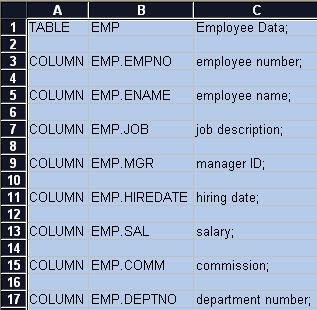
Using the first approach, the drawbacks include:
  • SQL DDL scripts tend to be error-prone
  • Comments are only for human reader and not part of the DB definitions
That's why we propose the second approach which can resolve these two issues.


Offline Database

In JDeveloper, database development is available offline in the context of a project, allowing developers to create and manipulate schemas of database objects which can be generated to a database or to SQL scripts. Database objects can also be imported from a database into a project. See my previous post for more details.

You can follow the instructions in [1, 2] to create offline database objects. For the demo, I've created a database diagram and drag an existing EMP table from the SCOTT schema to create a table on it.


Adding Comments

Double-click the EMP table component on the diagram to open the Edit Table dialog,

Select Comment in the navigation panel to enter table's comment as shown above.
Select Columns in the navigation panel and navigate them one by one. In the Comment field, enter column's comment as shown above. Click Save All to save your work.

In the Application Navigator, under Offline Database Sources | EMP_DATABASE | SCOTT, right-click the EMP node, and choose Generate To > SQL script ... to create SQL script file named emp.sql.
Open emp.sql in the editor window. Look for comments of table's and columns' at the bottom of the script as shown below:

COMMENT ON TABLE EMP IS 'Employee Data';

COMMENT ON COLUMN EMP.EMPNO IS 'employee number';

COMMENT ON COLUMN EMP.ENAME IS 'employee name';

COMMENT ON COLUMN EMP.JOB IS 'job description';

COMMENT ON COLUMN EMP.MGR IS 'manager ID';

COMMENT ON COLUMN EMP.HIREDATE IS 'hiring date';

COMMENT ON COLUMN EMP.SAL IS 'salary';

COMMENT ON COLUMN EMP.COMM IS 'commission';

COMMENT ON COLUMN EMP.DEPTNO IS 'department number';

Select the above comments and copy them into a text file (i.e., emp.txt).


Generating Comment Table

Start up Microsoft Excel and import text file as follows:
On the Text Import Wizard, you specify delimiters using space and paired single quotes as shown below:

After clicking on Finish button, you can remove column A,B, and E. It will then present you with the final comment table as shown at the beginning of this article.


Conclusion

Comment tables generated in the second approach have the following advantages:
  • The source of comment table is offline database object which can be validated by JDeveloper and can be source controlled.
  • They are part of the DB definitions and can be queried as follows:
    • select comments
      from user_tab_comments
      where table_name = 'EMP'
      /
    • select column_name, comments
      from user_col_comments
      where table_name = 'EMP'
      order by column_name
      /


References

  1. Database Development with JDeveloper
  2. Modeling Data with Offline Database in JDeveloper

Modeling Data with Offline Database in JDeveloper

For Oracle Applications developers, the JDeveloper offline database modeler replaces the Oracle Designer repository, or CASE as it was referred to. Applications developers should not use SQL DDL scripts for deployment and source control of database objects, because they tend to error-prone and do not serve as a single source of truth. Instead, developers should use the JDeveloper offline database object files.

What is the Offline Database

JDeveloper provides the tools you need to create and edit database objects, such as tables and constraints, outside the context of a database, using the offline Database model. You can create new tables and views, and generate the information to a database, or you can import database objects from a database schema, make the changes you want, and generate the changes back to the same database schema, to a new database schema, or to a file that you can run against a database at a later date.

Offline Database Model

The JDeveloper Offline database supports the following object types:
  • Function
  • Materialized View
  • Materialized View Log
  • Package
  • Procedure
  • Sequence
  • Synonym
  • Table
  • Trigger
  • Type
  • View
Currently, JDeveloper offline DB objects do not support these objects:
  • Queue
  • Queue tables
  • Policy
  • Context
However, SXML persistence files for these object types can be imported using the applxdf extension.
JDeveloper provides tools to create and edit database objects such as tables, view etc. outside the context of a database. This tool called Offline Database Definition will be used to model physical database objects in Fusion applications. The migration tool will support migrating all user selected database objects defined in CASE to this offline database definition in JDeveloper along with SXML/XDF1 deployment files.

Metadata SXML Comparison Tool[3]

Offline table definitions can be version controlled and shared using a source control system. If you just create objects in the DB schema via the database navigator, you have nothing to source control. JDeveloper provides a comparison tool optimized for working with offline table definitions, which handles:
  • The table data, properties, columns and constraints.
  • The identity of objects, to track name changes.
  • Checking for consistency, for example, ensuring:
    • That a column which is used in a key is not dropped.
    • That a constraint which uses an absent column is not added.
    • That a primary key column cannot be options.
Using this comparison tool, you can compare object metadata of the same type from different databases. This comparison depends on SXML. SXML is an XML representation which more closely maps to the SQL creation DDL. Two SXML documents of the same type can be compared and a new SXML document is provided which describes their differences.
Using this comparison tool, you're able to:
  • Compare object definitions in different JDeveloper projects
    • Since the objects to be compared are in separate projects, you need to create a dependency between them to be able to perform this comparison.
  • Compare versioned copies of DB objects
    • Versioning components allows you to browse through the historical changes of a component and make comparison between these versions. With JDEV, it's possible to compare different versions of database models.

Working on Data Modeling at Different Levels:

  • UML class diagram
    • You can create a logical model using a UML class diagram to visually create or inspect classes, interfaces, attributes, operations, associations, inheritance relationships, and implementation relations and transform it to an Offline or Online Database definitions later.
    • See this tutorial for how-to.
    • You usually do logical modeling using a UML class model in the following steps:
      1. Preparing a class model diagram Environment
      2. Creating a Class Model Diagram
      3. Enhancing the Class Model
      4. Transform the Class Model into a Database Model
  • Database diagram
    • You can follow [4, 5] to create new database diagram.
    • You can also drag tables, views, materialized views, synonyms, and sequences from a database schema onto a database diagram, where they become accessible as offline database objects.
  • Offline Database
    • You can create new offline database objects, or capture them from a connection to a live database. After you have finished working with them, you can generate new and updated database definitions to online database schemas or to SQL scripts.
    • You can follow the instructions in [4, 5] to create new offline database objects. When you create an offline database, you choose the database emulation (for example, Oracle11g Database Release 1) the offline database should have.
    • You can also copy offline database objects to a project. In general, it is a good idea to make sure that the offline database uses the same database emulation as the source database.
    • Note that generation to a database is not certified against non-Oracle databases.

Notes


  1. Prior to SXML migration, these were referred to as xdf (extension) files.

References

  1. http://susanduncan.blogspot.com/
  2. Database Development with JDeveloper
  3. Metadata SXML Comparison Tool
  4. Database Development with JDeveloper

© Travel for Life Guide. All Rights Reserved.

Analytical Insights on Health, Culture, and Security.